Windows版のClaude Codeで処理が終わったときに通知を出す方法です。
処理終わったときに通知してほしいですからね。
Macのやり方はよく見かけるのですがWindowsでのやり方あまり情報無かったのでまとめました。さくっとやり方だけ書きます。
Claude Code
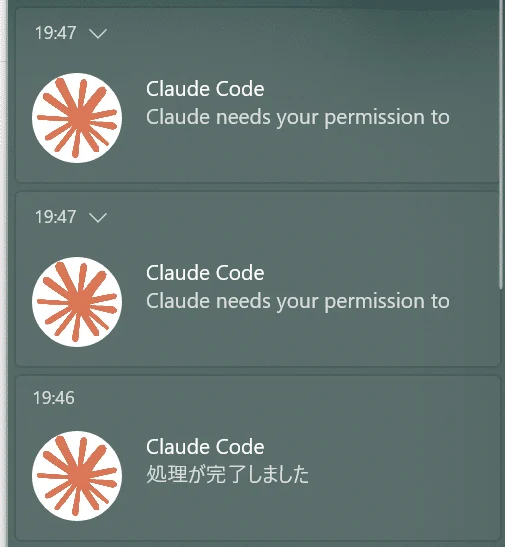
最初にBurntToastをインストール。
Install-Module -Name BurntToastHookにいろいろ登録。
C:\Users\(ユーザー名)\.claude\settings.json
に下記の内容を追記してClaude Code立ち上げ直しです。
(ユーザー名)は自分のパスに書き変えて。
{
  "hooks": {
    "Notification": [
      {
        "matcher": "",
        "hooks": [
          {
            "type": "command",
            "command": "powershell -Command \"$input = $input | Out-String; if ($input.Trim()) { $json = ConvertFrom-Json $input; Import-Module BurntToast; New-BurntToastNotification -Text 'Claude Code', $json.message -AppLogo 'C:\\Users\\(ユーザー名)\\.claude\\img\\claude-logo.png' -Sound Default }\""
          }
        ]
      }
    ],
    "Stop": [
      {
        "matcher": "",
        "hooks": [
          {
            "type": "command",
            "command": "powershell -Command \"Import-Module BurntToast; New-BurntToastNotification -Text 'Claude Code', '処理が完了しました' -AppLogo 'C:\\Users\\(ユーザー名)\\.claude\\img\\claude-logo.png' -Sound Default\""
          }
        ]
      }
    ],
    "SessionEnd": [
      {
        "matcher": "",
        "hooks": [
          {
            "type": "command",
            "command": "powershell -Command \"Import-Module BurntToast; New-BurntToastNotification -Text 'Claude Code', 'セッションが終了しました' -AppLogo 'C:\\Users\\(ユーザー名)\\.claude\\img\\claude-logo.png' -Sound Default\""
          }
        ]
      }
    ]
  }
}
NotificationだけClaude Codeからのメッセージを通知に表示するので少しややこしいことになっています。
Codex
C:\Users\(ユーザー名)\.codex\config.toml
ここに下記の内容を追記。
notify = ["pwsh", "C:\\Users\\(ユーザー名)\\.codex\\notify.ps1"].codexに notify.ps1 というファイルを作って下記を入れる。
New-BurntToastNotification -Text "Codex", "処理が完了しました" -Sound DefaultこれでCodexも通知が受け取れます。